On a Mac, Apple’s Continuity Camera lets you pick your iPhone as the camera in Tella for a much sharper picture than most built-in webcams. It needs iOS 16+ and macOS Ventura or later.
On a Mac, Apple’s Continuity Camera lets you pick your iPhone as the camera in Tella’s camera menu, giving you a much sharper picture than most built-in webcams. It needs iOS 16 or later and macOS Ventura or later.
How does Continuity Camera compare to other webcams?
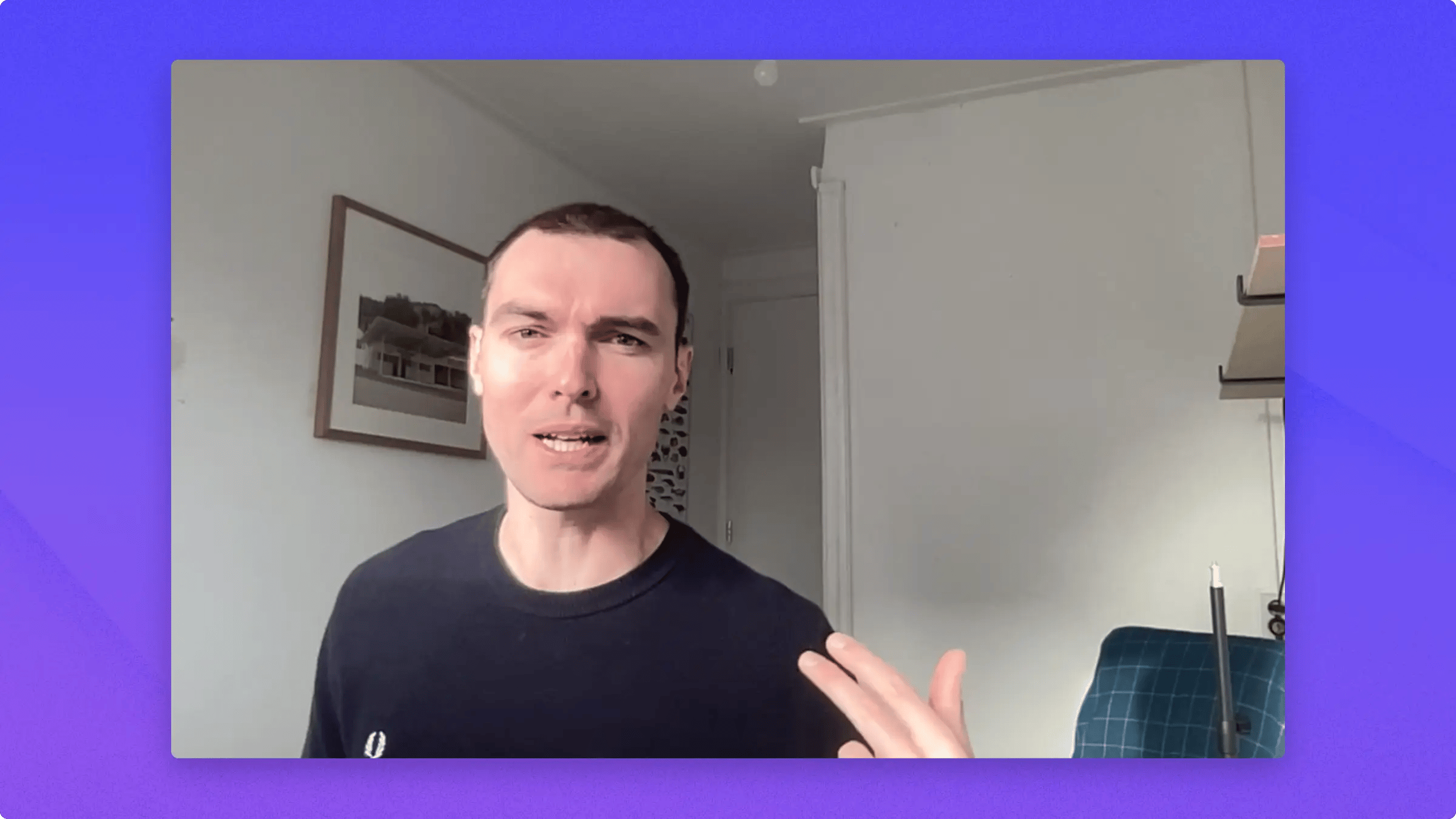
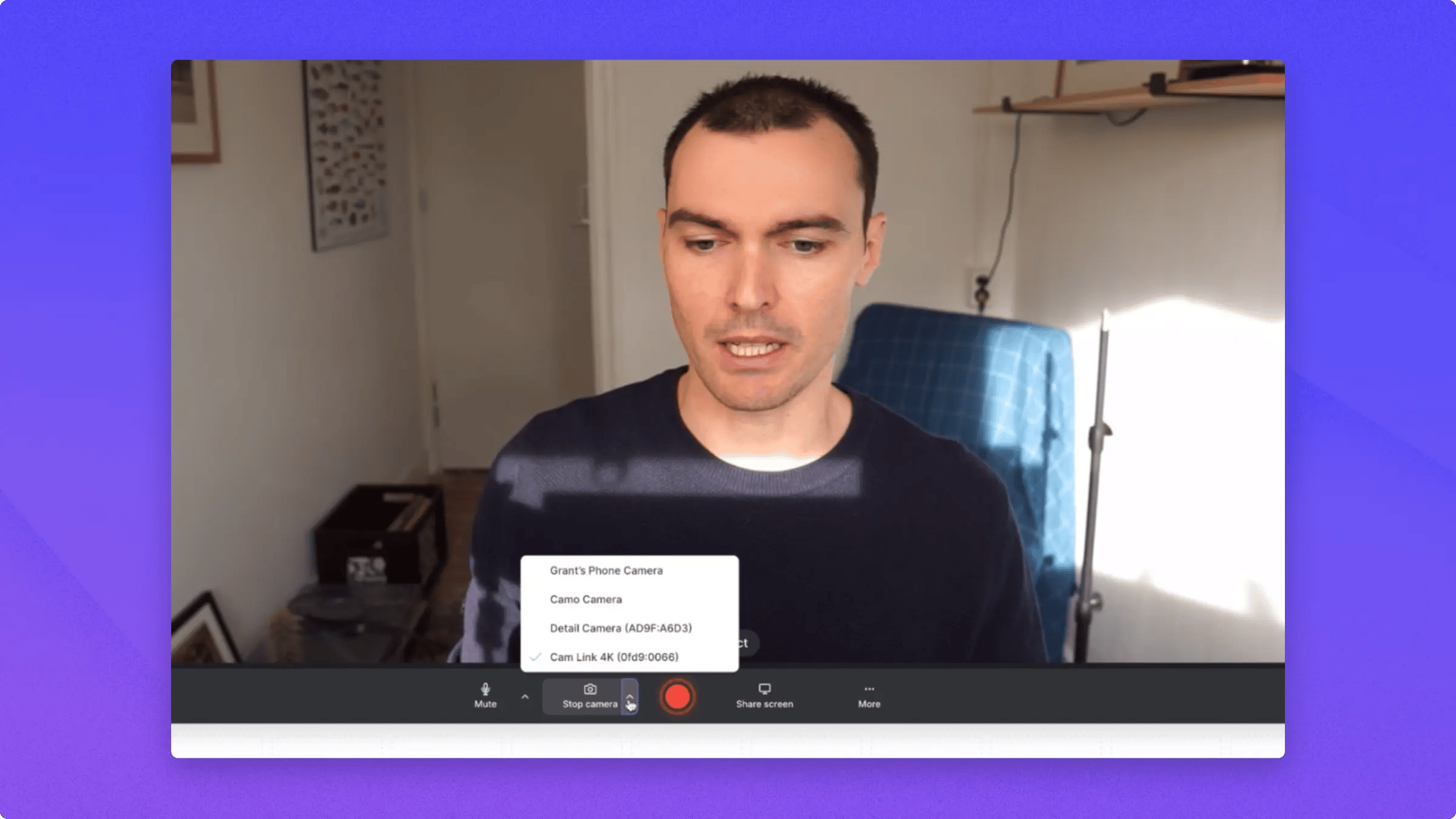
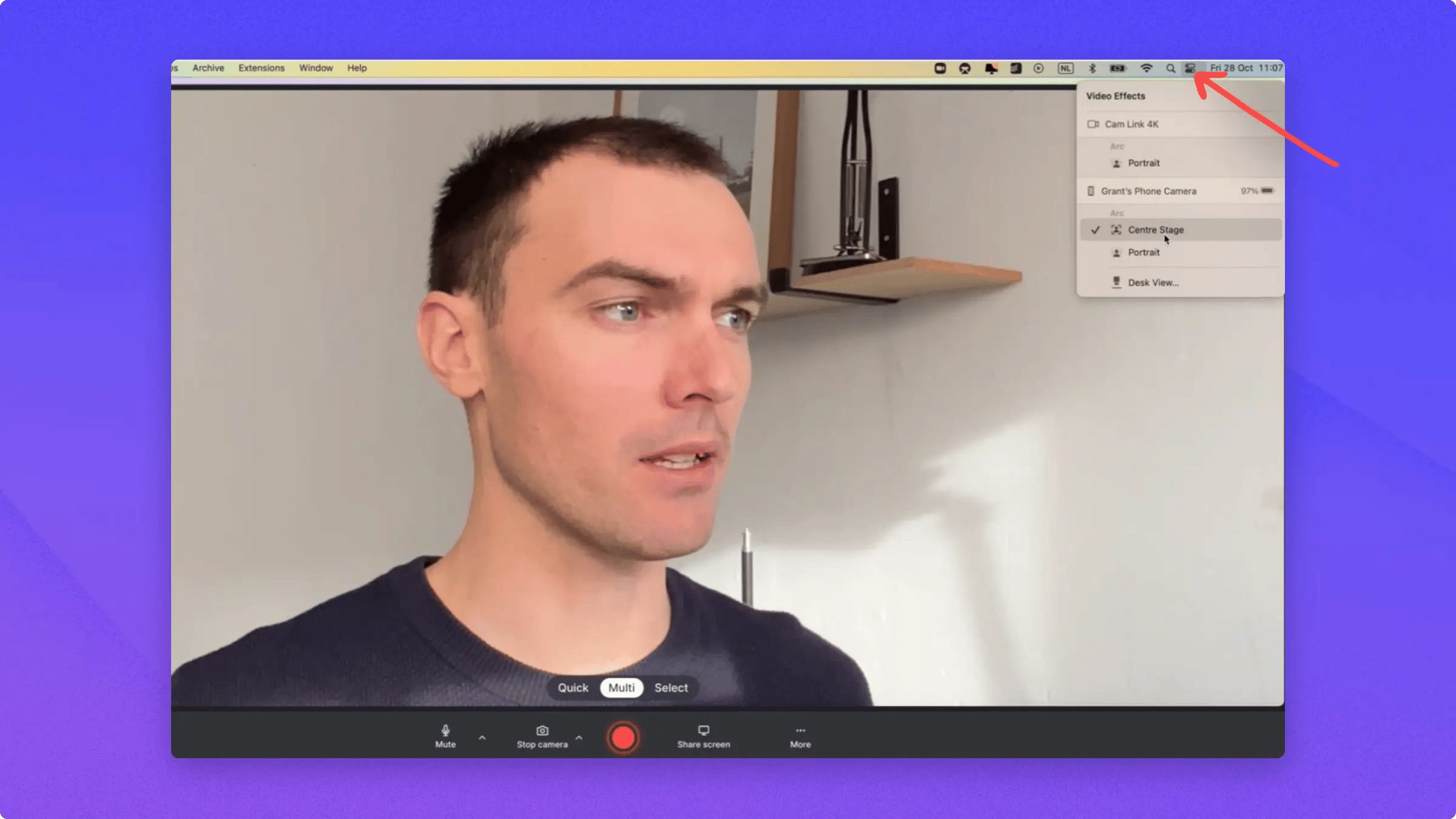
A Sony Mirrorless Camera with a large external lens, connected via CamLink, gives a great picture but is expensive:The built-in camera of a two-year-old all-in-one Mac isn’t great:Continuity Camera, with an iPhone on the desk connected wirelessly to the computer, gives excellent quality and adds video effects (see below):
Set up your iPhone as a webcam in Tella
In Tella (or any video app), open the camera option and click the name of your phone.Your phone plays a sound and connects. Then click this icon:In Video Effects, turn on Center Stage to follow you around and make the shot bigger, and Portrait Mode to blur your background.Continuity Camera needs iOS 16 or later on your iPhone and macOS Ventura or later on your Mac.
Turn off Center Stage (motion tracking)
If your camera keeps zooming or moving to follow you while you record, that’s Center Stage. It’s a macOS camera feature, not a Tella setting, and it’s turned on by default when you use your iPhone as a webcam.To turn it off:
Open the Tella recorder and select your camera so the preview is live.
Open Video Effects:
On macOS Ventura 13, click the Control Center icon in the menu bar, then click Video Effects.
On macOS Sonoma 14 or later, click the green camera icon in the menu bar, click your camera’s name if shown, then click Video Effects.
Click Center Stage to turn it off.
macOS remembers this setting per camera, so it stays off for your future recordings. The same menu also controls Portrait Mode and the other video effects.
Last modified on November 19, 2026
Was this page helpful?
{"docsConfig":{"theme":"mint","$schema":"https://mintlify.com/schema.json","name":"Tella","colors":{"primary":"#8278FA","light":"#B1AAFC","dark":"#5E51F8"},"logo":{"light":"https://mintcdn.com/tella/znRZoQ3e3rlGBTT2/logo-light.svg?fit=max\u0026auto=format\u0026n=znRZoQ3e3rlGBTT2\u0026q=85\u0026s=dd044b03efe593b53353a039bfb31fbf","dark":"https://mintcdn.com/tella/znRZoQ3e3rlGBTT2/logo-dark.svg?fit=max\u0026auto=format\u0026n=znRZoQ3e3rlGBTT2\u0026q=85\u0026s=88323f6b0165ce29c00e3a1d80c82fe3"},"favicon":"https://mintcdn.com/tella/munSRGpiNeMNXMvc/favicon.svg?fit=max\u0026auto=format\u0026n=munSRGpiNeMNXMvc\u0026q=85\u0026s=1b25a4dc5d9a41a1a9238eda432a0cb6","api":{"params":{"expanded":"all"},"playground":{"display":"interactive","proxy":true},"examples":{"defaults":"all","prefill":true},"url":"full","mdx":{"auth":{"method":"bearer"}}},"navbar":{"primary":{"type":"button","label":"Open Tella","href":"https://www.tella.com/videos"}},"footer":{"socials":{"github":"https://github.com/tellahq","x":"https://x.com/tellahq","linkedin":"https://linkedin.com/company/tellahq","youtube":"https://youtube.com/@tellahq","website":"https://tella.com","instagram":"https://instagram.com/tellahq"},"links":[{"header":"Tella features","items":[{"label":"Video trimming","href":"https://www.tella.com/features/video-trimming"},{"label":"Viewer downloads","href":"https://www.tella.com/features/viewer-download"},{"label":"4K export","href":"https://www.tella.com/features/4k-export"},{"label":"AI editing","href":"https://www.tella.com/features/ai-editing"},{"label":"Custom branding","href":"https://www.tella.com/features/custom-branding"},{"label":"Upload video","href":"https://www.tella.com/features/video-upload"},{"label":"Video clips","href":"https://www.tella.com/features/clips"},{"label":"Custom backgrounds","href":"https://www.tella.com/features/custom-backgrounds"},{"label":"All features","href":"https://www.tella.com/features"}]}]},"seo":{"paths":[{"path":"help","metatags":{"canonical":"https://www.tella.com"}},{"path":"changelog","metatags":{"canonical":"https://www.tella.com"}}]},"styling":{"eyebrows":"breadcrumbs","codeblocks":"system","latex":false},"contextual":{"options":["copy","assistant","view","chatgpt","claude","perplexity","grok","mcp","add-mcp","cursor","vscode"],"display":"header"},"interaction":{"drilldown":true},"metadata":{"timestamp":true},"markdown":{"schema":true},"navigation":{"global":{"anchors":[{"anchor":"Changelog","icon":"clock-rotate-left","href":"/changelog"},{"anchor":"Community","icon":"users","href":"https://community.tella.tv"},{"anchor":"System Status","icon":"signal","href":"https://status.tella.com"},{"anchor":"Contact Support","icon":"envelope","href":"mailto:support@tella.com"},{"anchor":"Debug","icon":"bug","href":"/help/support/debug-camera-and-microphone-issues"}]},"pages":[]}},"deployment":{"deploymentMetadataValue":{"subdomain":"tella","hasAudioNarration":false,"actualSubdomain":"tella","customDomains":["www.tella.com"],"gitSource":{"type":"github","owner":"tellahq","repo":"tella-fusion","deployBranch":"main","contentDirectory":"packages/core/webapp/docs","isPrivate":true,"mountPath":"","label":""},"feedback":{"thumbs":true,"contextualFeedback":{"allowEmail":true},"agentFeedback":true},"entitlements":{"AI_CHAT":{"status":"ENABLED"},"WEB_MCP":{"status":"ENABLED"},"NARRATION":{"status":"ENABLED"}},"buildId":"6b00ef34c953c2aa6bb620f0","clientVersion":"0.0.4270","searchFilterCounts":[{"language":"default","tag":"Help Center","count":272},{"language":"default","tag":"Developers","count":216},{"language":"default","tag":"API Reference","count":163},{"language":"default","tag":"Edit","count":75},{"language":"default","tag":"Clips","count":63},{"language":"default","tag":"Share and embed","count":41},{"language":"default","tag":"Videos","count":40},{"language":"default","tag":"MCP Tools","count":35},{"language":"default","tag":"Troubleshooting and support","count":33},{"language":"default","tag":"Account and workspace","count":31}],"searchSettings":{"isFiltersEnabled":true,"maxResults":15,"showContentSnippets":true,"fullPageSearch":true}},"assistantConfig":{"enableStarterQuestions":true,"enableContextualStarterQuestions":true,"deflection":{"enabled":true,"type":"email","email":"support@tella.com","showHelpButton":true}},"basePath":"/docs","hasChatPermissions":false,"hasWebMcpPermissions":true,"toggles":[{"name":"kill-isr","enabled":true,"variant":{"name":"disabled","enabled":false,"feature_enabled":true},"impressionData":false},{"name":"custom-rbac-roles","enabled":true,"variant":{"name":"disabled","enabled":false,"feature_enabled":true},"impressionData":false},{"name":"agent-mintlify-slack","enabled":true,"variant":{"name":"disabled","enabled":false,"feature_enabled":true},"impressionData":false},{"name":"agent-integrations-settings","enabled":true,"variant":{"name":"disabled","enabled":false,"feature_enabled":true},"impressionData":false},{"name":"rbac-expansion","enabled":true,"variant":{"name":"disabled","enabled":false,"feature_enabled":true},"impressionData":false},{"name":"automations-pr-grouping","enabled":true,"variant":{"name":"disabled","enabled":false,"feature_enabled":true},"impressionData":false},{"name":"custom-prefix","enabled":true,"variant":{"name":"disabled","enabled":false,"feature_enabled":true},"impressionData":false},{"name":"analytics-v7","enabled":true,"variant":{"name":"disabled","enabled":false,"feature_enabled":true},"impressionData":false},{"name":"user-flows-analytics","enabled":true,"variant":{"name":"disabled","enabled":false,"feature_enabled":true},"impressionData":false},{"name":"no-publish-flow","enabled":true,"variant":{"name":"disabled","enabled":false,"feature_enabled":true},"impressionData":false},{"name":"workos-onboarding","enabled":true,"variant":{"name":"disabled","enabled":false,"feature_enabled":true},"impressionData":false},{"name":"snapshot-serving-live","enabled":true,"variant":{"name":"disabled","enabled":false,"feature_enabled":true},"impressionData":false},{"name":"stripTemperatureMiddleware","enabled":true,"variant":{"name":"disabled","enabled":false,"feature_enabled":true},"impressionData":false},{"name":"support-platform-pylon-zendesk","enabled":true,"variant":{"name":"disabled","enabled":false,"feature_enabled":true},"impressionData":false},{"name":"snapshot-serving","enabled":true,"variant":{"name":"disabled","enabled":false,"feature_enabled":true},"impressionData":false},{"name":"instant-rollback","enabled":true,"variant":{"name":"disabled","enabled":false,"feature_enabled":true},"impressionData":false},{"name":"granular-notifications-server","enabled":true,"variant":{"name":"disabled","enabled":false,"feature_enabled":true},"impressionData":false},{"name":"granular-notifications","enabled":true,"variant":{"name":"disabled","enabled":false,"feature_enabled":true},"impressionData":false},{"name":"automations-fable","enabled":true,"variant":{"name":"disabled","enabled":false,"feature_enabled":true},"impressionData":false},{"name":"fixed-ai-action-pricing","enabled":true,"variant":{"name":"disabled","enabled":false,"feature_enabled":true},"impressionData":false},{"name":"site-roles","enabled":true,"variant":{"name":"disabled","enabled":false,"feature_enabled":true},"impressionData":false},{"name":"automation-resolve-merge-conflict","enabled":true,"variant":{"name":"disabled","enabled":false,"feature_enabled":true},"impressionData":false},{"name":"scoped-publishing","enabled":true,"variant":{"name":"disabled","enabled":false,"feature_enabled":true},"impressionData":false},{"name":"mintql","enabled":true,"variant":{"name":"disabled","enabled":false,"feature_enabled":true},"impressionData":false},{"name":"page-level-analytics","enabled":true,"variant":{"name":"disabled","enabled":false,"feature_enabled":true},"impressionData":false},{"name":"editor-version-history-v2","enabled":true,"variant":{"name":"disabled","enabled":false,"feature_enabled":true},"impressionData":false},{"name":"billing-page-v2","enabled":true,"variant":{"name":"disabled","enabled":false,"feature_enabled":true},"impressionData":false},{"name":"full-page-search","enabled":true,"variant":{"name":"disabled","enabled":false,"feature_enabled":true},"impressionData":false},{"name":"workspace-projects","enabled":true,"variant":{"name":"disabled","enabled":false,"feature_enabled":true},"impressionData":false},{"name":"assistant-v5","enabled":true,"variant":{"name":"disabled","enabled":false,"feature_enabled":true},"impressionData":false},{"name":"fork-pr-previews","enabled":true,"variant":{"name":"disabled","enabled":false,"feature_enabled":true},"impressionData":false},{"name":"revalidation-jwt","enabled":true,"variant":{"name":"disabled","enabled":false,"feature_enabled":true},"impressionData":false},{"name":"workos-sso-scim","enabled":true,"variant":{"name":"disabled","enabled":false,"feature_enabled":true},"impressionData":false},{"name":"hobby-abuse-scan","enabled":true,"variant":{"name":"disabled","enabled":false,"feature_enabled":true},"impressionData":false},{"name":"dashboard-inbox","enabled":true,"variant":{"name":"disabled","enabled":false,"feature_enabled":true},"impressionData":false},{"name":"workos-signup","enabled":true,"variant":{"name":"disabled","enabled":false,"feature_enabled":true},"impressionData":false},{"name":"turbopuffer-dual-write","enabled":true,"variant":{"name":"disabled","enabled":false,"feature_enabled":true},"impressionData":false},{"name":"workos-enabled","enabled":true,"variant":{"name":"disabled","enabled":false,"feature_enabled":true},"impressionData":false},{"name":"approve-review-flow","enabled":true,"variant":{"name":"disabled","enabled":false,"feature_enabled":true},"impressionData":false},{"name":"editor-metadata","enabled":true,"variant":{"name":"disabled","enabled":false,"feature_enabled":true},"impressionData":false},{"name":"sso-setup-deadline-banner","enabled":true,"variant":{"name":"disabled","enabled":false,"feature_enabled":true},"impressionData":false},{"name":"turbopuffer-serve","enabled":true,"variant":{"name":"disabled","enabled":false,"feature_enabled":true},"impressionData":false},{"name":"live-agents","enabled":true,"variant":{"name":"disabled","enabled":false,"feature_enabled":true},"impressionData":false},{"name":"starter-pricing","enabled":true,"variant":{"name":"control","enabled":true,"payload":{"type":"string","value":"control"},"feature_enabled":true},"impressionData":false},{"name":"llms-txt-v2","enabled":true,"variant":{"name":"disabled","enabled":false,"feature_enabled":true},"impressionData":false},{"name":"wildcard-email-auth","enabled":true,"variant":{"name":"disabled","enabled":false,"feature_enabled":true},"impressionData":false}],"privacy":{"consentBanner":{"enabled":false}},"googleFontsInlined":false},"customCss":[]}
{"page":{"pagePath":"help/tips/use-your-i-phone-as-a-webcam","slug":"/help/tips/use-your-i-phone-as-a-webcam","pageMetadata":{"title":"Use your iPhone as a webcam","description":"On a Mac, Apple's Continuity Camera lets you pick your iPhone as the camera in Tella for a much sharper picture than most built-in webcams. It needs iOS 16+ and macOS Ventura or later.","canonical":"https://www.tella.com/help/tips/use-your-i-phone-as-a-webcam","href":"/help/tips/use-your-i-phone-as-a-webcam"},"description":{"compiledSource":"\"use strict\";\nconst {jsx: _jsx} = arguments[0];\nconst {useMDXComponents: _provideComponents} = arguments[0];\nfunction _createMdxContent(props) {\n const _components = {\n p: \"p\",\n ..._provideComponents(),\n ...props.components\n };\n return _jsx(_components.p, {\n children: \"On a Mac, Apple’s Continuity Camera lets you pick your iPhone as the camera in Tella for a much sharper picture than most built-in webcams. It needs iOS 16+ and macOS Ventura or later.\"\n });\n}\nfunction MDXContent(props = {}) {\n const {wrapper: MDXLayout} = {\n ..._provideComponents(),\n ...props.components\n };\n return MDXLayout ? _jsx(MDXLayout, {\n ...props,\n children: _jsx(_createMdxContent, {\n ...props\n })\n }) : _createMdxContent(props);\n}\nreturn {\n default: MDXContent\n};\n","frontmatter":{},"scope":{}},"pageType":"default","mdx":{"mdxSource":{"compiledSource":"\"use strict\";const{Fragment:_Fragment,jsx:_jsx,jsxs:_jsxs}=arguments[0];const{useMDXComponents:_provideComponents}=arguments[0];function _createMdxContent(props){const _components={li:`li`,ol:`ol`,p:`p`,strong:`strong`,ul:`ul`,..._provideComponents(),...props.components},{Heading,OptimizedFrame,OptimizedImage}=_components;if(!Heading)_missingMdxReference(`Heading`,true);if(!OptimizedFrame)_missingMdxReference(`OptimizedFrame`,true);if(!OptimizedImage)_missingMdxReference(`OptimizedImage`,true);return _jsxs(_Fragment,{children:[_jsxs(_components.p,{children:[`On a Mac, Apple’s `,_jsx(_components.strong,{children:`Continuity Camera`}),` lets you pick your iPhone as the camera in Tella’s camera menu, giving you a much sharper picture than most built-in webcams. It needs iOS 16 or later and macOS Ventura or later.`]}),`\n`,_jsx(OptimizedFrame,{src:`https://www.tella.com/video/cl9s8v5ur00r40fm9hwh92idu/embed?b=0\u0026title=0\u0026a=1\u0026loop=0\u0026t=0\u0026muted=0\u0026wt=0`,width:`100%`,style:{aspectRatio:`16/9`,border:`none`,borderRadius:`8px`},allow:`autoplay; fullscreen`}),`\n`,_jsx(Heading,{level:`2`,id:`how-does-continuity-camera-compare-to-other-webcams`,children:`How does Continuity Camera compare to other webcams?`}),`\n`,_jsxs(_components.p,{children:[`A `,_jsx(_components.strong,{children:`Sony Mirrorless Camera`}),` with a large external lens, connected via `,_jsx(_components.strong,{children:`CamLink`}),`, gives a great picture but is expensive:`]}),`\n`,_jsx(OptimizedImage,{src:`https://mintcdn.com/tella/vYt7miVnTICBcDJU/help/images/tips/1-2.png?fit=max\u0026auto=format\u0026n=vYt7miVnTICBcDJU\u0026q=85\u0026s=76024a60594206015d5690d2fb218277`,alt:`1 2.png`,\"data-og-width\":`2400`,width:`2400`,\"data-og-height\":`1350`,height:`1350`,\"data-path\":`help/images/tips/1-2.png`,\"data-optimize\":`true`,\"data-opv\":`3`,srcset:`https://mintcdn.com/tella/vYt7miVnTICBcDJU/help/images/tips/1-2.png?w=280\u0026fit=max\u0026auto=format\u0026n=vYt7miVnTICBcDJU\u0026q=85\u0026s=d585420841ca21e4e5c3cf915cf42371 280w, https://mintcdn.com/tella/vYt7miVnTICBcDJU/help/images/tips/1-2.png?w=560\u0026fit=max\u0026auto=format\u0026n=vYt7miVnTICBcDJU\u0026q=85\u0026s=78df10beba8ffd7226fc2664d1b5e216 560w, https://mintcdn.com/tella/vYt7miVnTICBcDJU/help/images/tips/1-2.png?w=840\u0026fit=max\u0026auto=format\u0026n=vYt7miVnTICBcDJU\u0026q=85\u0026s=8ab46e3037c6ca3c1f84ddb6719a5ff6 840w, https://mintcdn.com/tella/vYt7miVnTICBcDJU/help/images/tips/1-2.png?w=1100\u0026fit=max\u0026auto=format\u0026n=vYt7miVnTICBcDJU\u0026q=85\u0026s=7cd4fcbc9cc26eb6b855e5216ed88e38 1100w, https://mintcdn.com/tella/vYt7miVnTICBcDJU/help/images/tips/1-2.png?w=1650\u0026fit=max\u0026auto=format\u0026n=vYt7miVnTICBcDJU\u0026q=85\u0026s=c447ff6cb850b91ec935578e99755564 1650w, https://mintcdn.com/tella/vYt7miVnTICBcDJU/help/images/tips/1-2.png?w=2500\u0026fit=max\u0026auto=format\u0026n=vYt7miVnTICBcDJU\u0026q=85\u0026s=7f55f1fca539279ba3a2a3647bbd00ec 2500w`}),`\n`,_jsx(_components.p,{children:`The built-in camera of a two-year-old all-in-one Mac isn’t great:`}),`\n`,_jsx(OptimizedImage,{src:`https://mintcdn.com/tella/vYt7miVnTICBcDJU/help/images/tips/2-2.png?fit=max\u0026auto=format\u0026n=vYt7miVnTICBcDJU\u0026q=85\u0026s=948f4c4904743cef2953b798eeb43330`,alt:`2 2.png`,\"data-og-width\":`2400`,width:`2400`,\"data-og-height\":`1350`,height:`1350`,\"data-path\":`help/images/tips/2-2.png`,\"data-optimize\":`true`,\"data-opv\":`3`,srcset:`https://mintcdn.com/tella/vYt7miVnTICBcDJU/help/images/tips/2-2.png?w=280\u0026fit=max\u0026auto=format\u0026n=vYt7miVnTICBcDJU\u0026q=85\u0026s=13db761f6ff23fcb23c02e51c8070111 280w, https://mintcdn.com/tella/vYt7miVnTICBcDJU/help/images/tips/2-2.png?w=560\u0026fit=max\u0026auto=format\u0026n=vYt7miVnTICBcDJU\u0026q=85\u0026s=a524eb7533b71b45ef058e8cd58df2f9 560w, https://mintcdn.com/tella/vYt7miVnTICBcDJU/help/images/tips/2-2.png?w=840\u0026fit=max\u0026auto=format\u0026n=vYt7miVnTICBcDJU\u0026q=85\u0026s=ee0711aad9cd597278607f2f08554025 840w, https://mintcdn.com/tella/vYt7miVnTICBcDJU/help/images/tips/2-2.png?w=1100\u0026fit=max\u0026auto=format\u0026n=vYt7miVnTICBcDJU\u0026q=85\u0026s=c8c990bf950b48feea9f8d9c28319801 1100w, https://mintcdn.com/tella/vYt7miVnTICBcDJU/help/images/tips/2-2.png?w=1650\u0026fit=max\u0026auto=format\u0026n=vYt7miVnTICBcDJU\u0026q=85\u0026s=63f107e2768bed94e45e4681a280c551 1650w, https://mintcdn.com/tella/vYt7miVnTICBcDJU/help/images/tips/2-2.png?w=2500\u0026fit=max\u0026auto=format\u0026n=vYt7miVnTICBcDJU\u0026q=85\u0026s=2ae8bb6b49812d2b2122ac228bea5633 2500w`}),`\n`,_jsxs(_components.p,{children:[_jsx(_components.strong,{children:`Continuity Camera`}),`, with an iPhone on the desk connected wirelessly to the computer, gives excellent quality and adds video effects (see below):`]}),`\n`,_jsx(OptimizedImage,{src:`https://mintcdn.com/tella/vYt7miVnTICBcDJU/help/images/tips/3-2.png?fit=max\u0026auto=format\u0026n=vYt7miVnTICBcDJU\u0026q=85\u0026s=6bf854c04f8cd2703e126c1722a559d1`,alt:`3 2.png`,\"data-og-width\":`2400`,width:`2400`,\"data-og-height\":`1350`,height:`1350`,\"data-path\":`help/images/tips/3-2.png`,\"data-optimize\":`true`,\"data-opv\":`3`,srcset:`https://mintcdn.com/tella/vYt7miVnTICBcDJU/help/images/tips/3-2.png?w=280\u0026fit=max\u0026auto=format\u0026n=vYt7miVnTICBcDJU\u0026q=85\u0026s=28342a2498739237cf9538350598f6bd 280w, https://mintcdn.com/tella/vYt7miVnTICBcDJU/help/images/tips/3-2.png?w=560\u0026fit=max\u0026auto=format\u0026n=vYt7miVnTICBcDJU\u0026q=85\u0026s=253d56bf52db3edf374ac74adc05c295 560w, https://mintcdn.com/tella/vYt7miVnTICBcDJU/help/images/tips/3-2.png?w=840\u0026fit=max\u0026auto=format\u0026n=vYt7miVnTICBcDJU\u0026q=85\u0026s=9d11423ab731f9361029fa34e7412545 840w, https://mintcdn.com/tella/vYt7miVnTICBcDJU/help/images/tips/3-2.png?w=1100\u0026fit=max\u0026auto=format\u0026n=vYt7miVnTICBcDJU\u0026q=85\u0026s=4a1a7031c950548e007782162a8410a1 1100w, https://mintcdn.com/tella/vYt7miVnTICBcDJU/help/images/tips/3-2.png?w=1650\u0026fit=max\u0026auto=format\u0026n=vYt7miVnTICBcDJU\u0026q=85\u0026s=9a434d8f9f3368772f65de7c95292540 1650w, https://mintcdn.com/tella/vYt7miVnTICBcDJU/help/images/tips/3-2.png?w=2500\u0026fit=max\u0026auto=format\u0026n=vYt7miVnTICBcDJU\u0026q=85\u0026s=88d7dbf4abb8a59ccd686d4f68a056af 2500w`}),`\n`,_jsx(Heading,{level:`2`,id:`set-up-your-iphone-as-a-webcam-in-tella`,children:`Set up your iPhone as a webcam in Tella`}),`\n`,_jsxs(_components.p,{children:[`In `,_jsx(_components.strong,{children:`Tella`}),` (or any video app), open the camera option and click the name of your phone.`]}),`\n`,_jsx(OptimizedImage,{src:`https://mintcdn.com/tella/vYt7miVnTICBcDJU/help/images/tips/4-2.png?fit=max\u0026auto=format\u0026n=vYt7miVnTICBcDJU\u0026q=85\u0026s=b94549fb86d737caf43b8dd41c10a4bd`,alt:`4 2.png`,\"data-og-width\":`2400`,width:`2400`,\"data-og-height\":`1350`,height:`1350`,\"data-path\":`help/images/tips/4-2.png`,\"data-optimize\":`true`,\"data-opv\":`3`,srcset:`https://mintcdn.com/tella/vYt7miVnTICBcDJU/help/images/tips/4-2.png?w=280\u0026fit=max\u0026auto=format\u0026n=vYt7miVnTICBcDJU\u0026q=85\u0026s=e33def3e82251095eceec8cd258a3624 280w, https://mintcdn.com/tella/vYt7miVnTICBcDJU/help/images/tips/4-2.png?w=560\u0026fit=max\u0026auto=format\u0026n=vYt7miVnTICBcDJU\u0026q=85\u0026s=53a6c8c6da428dd65151379da79da186 560w, https://mintcdn.com/tella/vYt7miVnTICBcDJU/help/images/tips/4-2.png?w=840\u0026fit=max\u0026auto=format\u0026n=vYt7miVnTICBcDJU\u0026q=85\u0026s=4fce73d3a66294e4e0126548d652bcf5 840w, https://mintcdn.com/tella/vYt7miVnTICBcDJU/help/images/tips/4-2.png?w=1100\u0026fit=max\u0026auto=format\u0026n=vYt7miVnTICBcDJU\u0026q=85\u0026s=8ccc4db3ea7a7923225aa53112b3ea19 1100w, https://mintcdn.com/tella/vYt7miVnTICBcDJU/help/images/tips/4-2.png?w=1650\u0026fit=max\u0026auto=format\u0026n=vYt7miVnTICBcDJU\u0026q=85\u0026s=dfa95fcef7b0587138a2b19d78ef4f79 1650w, https://mintcdn.com/tella/vYt7miVnTICBcDJU/help/images/tips/4-2.png?w=2500\u0026fit=max\u0026auto=format\u0026n=vYt7miVnTICBcDJU\u0026q=85\u0026s=d69e96959860d7938b10366c19361152 2500w`}),`\n`,_jsx(_components.p,{children:`Your phone plays a sound and connects. Then click this icon:`}),`\n`,_jsx(OptimizedImage,{src:`https://mintcdn.com/tella/vYt7miVnTICBcDJU/help/images/tips/5-2.png?fit=max\u0026auto=format\u0026n=vYt7miVnTICBcDJU\u0026q=85\u0026s=c0b4373f9cc70c8f6adc2813964f83e7`,alt:`5 2.png`,\"data-og-width\":`2400`,width:`2400`,\"data-og-height\":`1350`,height:`1350`,\"data-path\":`help/images/tips/5-2.png`,\"data-optimize\":`true`,\"data-opv\":`3`,srcset:`https://mintcdn.com/tella/vYt7miVnTICBcDJU/help/images/tips/5-2.png?w=280\u0026fit=max\u0026auto=format\u0026n=vYt7miVnTICBcDJU\u0026q=85\u0026s=0edc82ff92d7c1207cbef3b0e0a8f007 280w, https://mintcdn.com/tella/vYt7miVnTICBcDJU/help/images/tips/5-2.png?w=560\u0026fit=max\u0026auto=format\u0026n=vYt7miVnTICBcDJU\u0026q=85\u0026s=a61c3b3bd870a6e3e6dd068452dcef11 560w, https://mintcdn.com/tella/vYt7miVnTICBcDJU/help/images/tips/5-2.png?w=840\u0026fit=max\u0026auto=format\u0026n=vYt7miVnTICBcDJU\u0026q=85\u0026s=7a572721dd885eb7f1ece88f124e391c 840w, https://mintcdn.com/tella/vYt7miVnTICBcDJU/help/images/tips/5-2.png?w=1100\u0026fit=max\u0026auto=format\u0026n=vYt7miVnTICBcDJU\u0026q=85\u0026s=7476e6fb002b1fc8359b19d36420be50 1100w, https://mintcdn.com/tella/vYt7miVnTICBcDJU/help/images/tips/5-2.png?w=1650\u0026fit=max\u0026auto=format\u0026n=vYt7miVnTICBcDJU\u0026q=85\u0026s=a851e7769916ac159615fd51ca31f160 1650w, https://mintcdn.com/tella/vYt7miVnTICBcDJU/help/images/tips/5-2.png?w=2500\u0026fit=max\u0026auto=format\u0026n=vYt7miVnTICBcDJU\u0026q=85\u0026s=62a99357a69c6c0f36616449a4f733e6 2500w`}),`\n`,_jsxs(_components.p,{children:[`In `,_jsx(_components.strong,{children:`Video Effects`}),`, turn on `,_jsx(_components.strong,{children:`Center Stage`}),` to follow you around and make the shot bigger, and `,_jsx(_components.strong,{children:`Portrait Mode`}),` to blur your background.`]}),`\n`,_jsxs(_components.p,{children:[`Continuity Camera needs `,_jsx(_components.strong,{children:`iOS 16`}),` or later on your iPhone and `,_jsx(_components.strong,{children:`macOS Ventura`}),` or later on your Mac.`]}),`\n`,_jsx(Heading,{level:`2`,id:`turn-off-center-stage-motion-tracking`,children:`Turn off Center Stage (motion tracking)`}),`\n`,_jsxs(_components.p,{children:[`If your camera keeps zooming or moving to follow you while you record, that’s `,_jsx(_components.strong,{children:`Center Stage`}),`. It’s a macOS camera feature, not a Tella setting, and it’s turned on by default when you use your iPhone as a webcam.`]}),`\n`,_jsx(_components.p,{children:`To turn it off:`}),`\n`,_jsxs(_components.ol,{children:[`\n`,_jsx(_components.li,{children:`Open the Tella recorder and select your camera so the preview is live.`}),`\n`,_jsxs(_components.li,{children:[`Open `,_jsx(_components.strong,{children:`Video Effects`}),`:`,`\n`,_jsxs(_components.ul,{children:[`\n`,_jsxs(_components.li,{children:[`On macOS Ventura 13, click the `,_jsx(_components.strong,{children:`Control Center`}),` icon in the menu bar, then click `,_jsx(_components.strong,{children:`Video Effects`}),`.`]}),`\n`,_jsxs(_components.li,{children:[`On macOS Sonoma 14 or later, click the `,_jsx(_components.strong,{children:`green camera icon`}),` in the menu bar, click your camera’s name if shown, then click `,_jsx(_components.strong,{children:`Video Effects`}),`.`]}),`\n`]}),`\n`]}),`\n`,_jsxs(_components.li,{children:[`Click `,_jsx(_components.strong,{children:`Center Stage`}),` to turn it off.`]}),`\n`]}),`\n`,_jsx(_components.p,{children:`macOS remembers this setting per camera, so it stays off for your future recordings. The same menu also controls Portrait Mode and the other video effects.`})]})}function MDXContent(props={}){const{wrapper:MDXLayout}={..._provideComponents(),...props.components};return MDXLayout?_jsx(MDXLayout,{...props,children:_jsx(_createMdxContent,{...props})}):_createMdxContent(props)}return{default:MDXContent};function _missingMdxReference(id,component){throw new Error(`Expected `+(component?`component`:`object`)+\" `\"+id+\"` to be defined: you likely forgot to import, pass, or provide it.\")}","frontmatter":{},"scope":{"codeStyling":"system","config":{},"pageMetadata":{"title":"Use your iPhone as a webcam","description":"On a Mac, Apple's Continuity Camera lets you pick your iPhone as the camera in Tella for a much sharper picture than most built-in webcams. It needs iOS 16+ and macOS Ventura or later.","canonical":"https://www.tella.com/help/tips/use-your-i-phone-as-a-webcam","href":"/help/tips/use-your-i-phone-as-a-webcam"}}},"mdxSourceWithNoJs":null},"mdxExtracts":{"tableOfContents":[{"title":"How does Continuity Camera compare to other webcams?","slug":"how-does-continuity-camera-compare-to-other-webcams","depth":2,"children":[]},{"title":"Set up your iPhone as a webcam in Tella","slug":"set-up-your-iphone-as-a-webcam-in-tella","depth":2,"children":[]},{"title":"Turn off Center Stage (motion tracking)","slug":"turn-off-center-stage-motion-tracking","depth":2,"children":[]}],"codeExamples":{}},"jsLinks":["/docs/_mintlify/custom/tella/0df50391d431fa00/support-chat.js","/docs/_mintlify/custom/tella/7e6fe091e3982139/lettervisit.js"],"subdomain":"tella","siteName":"Tella","title":"Use your iPhone as a webcam - Tella","relatedPagesConfig":{"enabled":true,"limit":5,"mode":"automatic"},"contextualStarterQuestions":[{"_id":"6aff7511cec0c8e26bf1a122","deploymentId":"68c9b8eae1828f3bd1ee878f","questionText":"What are the system requirements?","status":"active","generatedBy":"contextual","path":"help/tips/use-your-i-phone-as-a-webcam","createdAt":"2026-11-19T22:15:45.558Z","updatedAt":"2026-11-19T22:15:45.558Z","__v":0},{"_id":"6aff7511cec0c8e26bf1a123","deploymentId":"68c9b8eae1828f3bd1ee878f","questionText":"How does it compare to other cameras?","status":"active","generatedBy":"contextual","path":"help/tips/use-your-i-phone-as-a-webcam","createdAt":"2026-11-19T22:15:45.558Z","updatedAt":"2026-11-19T22:15:45.558Z","__v":0},{"_id":"6aff7511cec0c8e26bf1a121","deploymentId":"68c9b8eae1828f3bd1ee878f","questionText":"How do I use my iPhone as a webcam?","status":"active","generatedBy":"contextual","path":"help/tips/use-your-i-phone-as-a-webcam","createdAt":"2026-11-19T22:15:45.558Z","updatedAt":"2026-11-19T22:15:45.558Z","__v":0}],"navMaps":{"firstHrefInVersion":{},"firstHrefInLanguage":{},"searchTabScopes":[{"tab":"Help Center"},{"tab":"Developers"},{"tab":"Changelog"}]},"lastModified":"2026-11-19T22:15:30.901Z","gitLastModified":"2026-11-19T22:15:08.000Z","originalFileLocation":"help/tips/use-your-i-phone-as-a-webcam.mdx"},"headHtml":"\u003cscript data-mint-head>(function(){var d=document.documentElement,p=null;if(!p){try{p=localStorage.getItem(\"isDarkMode\")}catch(e){}if(p==='true')p='dark';else if(p==='false')p='light';if(p!=='light'\u0026\u0026p!=='dark'\u0026\u0026p!=='system')p=\"system\"}var r=p==='system'?(matchMedia(\"(prefers-color-scheme: dark)\").matches?'dark':'light'):p;d.classList.remove(r==='dark'?'light':'dark');d.classList.add(r);d.setAttribute(\"data-theme-preference\",p)})();\u003c/script>\u003cmeta data-mint-head name=\"description\" content=\"On a Mac, Apple\u0026#x27;s Continuity Camera lets you pick your iPhone as the camera in Tella for a much sharper picture than most built-in webcams. It needs iOS 16+ and macOS Ventura or later.\">\u003cmeta data-mint-head name=\"application-name\" content=\"Tella\">\u003cmeta data-mint-head name=\"generator\" content=\"Mintlify\">\u003clink data-mint-head rel=\"icon\" type=\"image/png\" sizes=\"192x192\" href=\"/docs/mintlify-assets/_mintlify/favicons/tella/dDRDWwVgURpbIwO7/_generated/favicon/android-chrome-192x192.png\" media=\"(prefers-color-scheme: light)\">\u003clink data-mint-head rel=\"apple-touch-icon\" type=\"image/png\" sizes=\"180x180\" href=\"/docs/mintlify-assets/_mintlify/favicons/tella/dDRDWwVgURpbIwO7/_generated/favicon/apple-touch-icon.png\">\u003clink data-mint-head rel=\"icon\" type=\"image/png\" sizes=\"16x16\" href=\"/docs/mintlify-assets/_mintlify/favicons/tella/dDRDWwVgURpbIwO7/_generated/favicon/favicon-16x16.png\" media=\"(prefers-color-scheme: light)\">\u003clink data-mint-head rel=\"icon\" type=\"image/png\" sizes=\"32x32\" href=\"/docs/mintlify-assets/_mintlify/favicons/tella/dDRDWwVgURpbIwO7/_generated/favicon/favicon-32x32.png\" media=\"(prefers-color-scheme: light)\">\u003clink data-mint-head rel=\"shortcut icon\" type=\"image/x-icon\" href=\"/docs/mintlify-assets/_mintlify/favicons/tella/dDRDWwVgURpbIwO7/_generated/favicon/favicon.ico\" media=\"(prefers-color-scheme: light)\">\u003clink data-mint-head rel=\"icon\" type=\"image/png\" sizes=\"192x192\" href=\"/docs/mintlify-assets/_mintlify/favicons/tella/dDRDWwVgURpbIwO7/_generated/favicon-dark/android-chrome-192x192.png\" media=\"(prefers-color-scheme: dark)\">\u003clink data-mint-head rel=\"icon\" type=\"image/png\" sizes=\"16x16\" href=\"/docs/mintlify-assets/_mintlify/favicons/tella/dDRDWwVgURpbIwO7/_generated/favicon-dark/favicon-16x16.png\" media=\"(prefers-color-scheme: dark)\">\u003clink data-mint-head rel=\"icon\" type=\"image/png\" sizes=\"32x32\" href=\"/docs/mintlify-assets/_mintlify/favicons/tella/dDRDWwVgURpbIwO7/_generated/favicon-dark/favicon-32x32.png\" media=\"(prefers-color-scheme: dark)\">\u003clink data-mint-head rel=\"shortcut icon\" type=\"image/x-icon\" href=\"/docs/mintlify-assets/_mintlify/favicons/tella/dDRDWwVgURpbIwO7/_generated/favicon-dark/favicon.ico\" media=\"(prefers-color-scheme: dark)\">\u003cmeta data-mint-head property=\"og:title\" content=\"Use your iPhone as a webcam - Tella\">\u003cmeta data-mint-head property=\"og:description\" content=\"On a Mac, Apple\u0026#x27;s Continuity Camera lets you pick your iPhone as the camera in Tella for a much sharper picture than most built-in webcams. It needs iOS 16+ and macOS Ventura or later.\">\u003cmeta data-mint-head property=\"og:site_name\" content=\"Tella\">\u003cmeta data-mint-head property=\"og:url\" content=\"https://www.tella.com/help/tips/use-your-i-phone-as-a-webcam\">\u003cmeta data-mint-head property=\"og:type\" content=\"website\">\u003cmeta data-mint-head property=\"og:image\" content=\"https://tella.mintlify.site/docs/_mintlify/api/og/v2?division=Set+up+your+recording\u0026amp;title=Use+your+iPhone+as+a+webcam\u0026amp;description=On+a+Mac%2C+Apple%27s+Continuity+Camera+lets+you+pick+your+iPhone+as+the+camera+in+Tella+for+a+much+sharper+picture+than+most+built-in+webcams.+It+needs+iOS+16%2B+and\u0026amp;theme=83fc5c73f5b3900df40eca67\u0026amp;signature=861233b7f0d9ad38b08e85f0c56ea352f1b9dfa2b5f7c9ccb9f9716ab3b2f10f\">\u003cmeta data-mint-head property=\"og:image:width\" content=\"1200\">\u003cmeta data-mint-head property=\"og:image:height\" content=\"630\">\u003cmeta data-mint-head name=\"twitter:card\" content=\"summary_large_image\">\u003cmeta data-mint-head name=\"twitter:title\" content=\"Use your iPhone as a webcam - Tella\">\u003cmeta data-mint-head name=\"twitter:description\" content=\"On a Mac, Apple\u0026#x27;s Continuity Camera lets you pick your iPhone as the camera in Tella for a much sharper picture than most built-in webcams. It needs iOS 16+ and macOS Ventura or later.\">\u003cmeta data-mint-head name=\"twitter:image\" content=\"https://tella.mintlify.site/docs/_mintlify/api/og/v2?division=Set+up+your+recording\u0026amp;title=Use+your+iPhone+as+a+webcam\u0026amp;description=On+a+Mac%2C+Apple%27s+Continuity+Camera+lets+you+pick+your+iPhone+as+the+camera+in+Tella+for+a+much+sharper+picture+than+most+built-in+webcams.+It+needs+iOS+16%2B+and\u0026amp;theme=83fc5c73f5b3900df40eca67\u0026amp;signature=861233b7f0d9ad38b08e85f0c56ea352f1b9dfa2b5f7c9ccb9f9716ab3b2f10f\">\u003cmeta data-mint-head name=\"twitter:image:width\" content=\"1200\">\u003cmeta data-mint-head name=\"twitter:image:height\" content=\"630\">\u003cmeta data-mint-head name=\"msapplication-config\" content=\"/docs/mintlify-assets/_mintlify/favicons/tella/dDRDWwVgURpbIwO7/_generated/favicon/browserconfig.xml\">\u003cmeta data-mint-head name=\"apple-mobile-web-app-title\" content=\"Tella\">\u003cmeta data-mint-head name=\"msapplication-TileColor\" content=\"#8278FA\">\u003clink data-mint-head rel=\"canonical\" href=\"https://www.tella.com/help/tips/use-your-i-phone-as-a-webcam\">\u003clink data-mint-head rel=\"alternate\" type=\"application/xml\" href=\"/docs/sitemap.xml\">\u003clink data-mint-head rel=\"alternate\" type=\"text/markdown\" href=\"/docs/help/tips/use-your-i-phone-as-a-webcam.md\">\u003cscript data-mint-head type=\"application/ld+json\">{\"@context\":\"https://schema.org\",\"@graph\":[{\"@type\":\"Organization\",\"@id\":\"https://www.tella.com/#organization\",\"name\":\"Tella\",\"url\":\"https://www.tella.com\",\"logo\":{\"@type\":\"ImageObject\",\"url\":\"https://mintcdn.com/tella/znRZoQ3e3rlGBTT2/logo-light.svg?fit=max\u0026auto=format\u0026n=znRZoQ3e3rlGBTT2\u0026q=85\u0026s=dd044b03efe593b53353a039bfb31fbf\"}},{\"@type\":\"WebSite\",\"@id\":\"https://www.tella.com/docs#website\",\"name\":\"Tella\",\"url\":\"https://www.tella.com/docs\",\"publisher\":{\"@id\":\"https://www.tella.com/#organization\"}},{\"@type\":\"WebPage\",\"@id\":\"https://www.tella.com/help/tips/use-your-i-phone-as-a-webcam#webpage\",\"url\":\"https://www.tella.com/help/tips/use-your-i-phone-as-a-webcam\",\"name\":\"Use your iPhone as a webcam\",\"description\":\"On a Mac, Apple's Continuity Camera lets you pick your iPhone as the camera in Tella for a much sharper picture than most built-in webcams. It needs iOS 16+ and macOS Ventura or later.\",\"dateModified\":\"2026-11-19T22:15:08.000Z\",\"isPartOf\":{\"@id\":\"https://www.tella.com/docs#website\"},\"breadcrumb\":{\"@id\":\"https://www.tella.com/help/tips/use-your-i-phone-as-a-webcam#breadcrumb\"}},{\"@type\":\"BreadcrumbList\",\"@id\":\"https://www.tella.com/help/tips/use-your-i-phone-as-a-webcam#breadcrumb\",\"itemListElement\":[{\"@type\":\"ListItem\",\"position\":1,\"name\":\"Record\",\"item\":\"https://www.tella.com/docs/help/recording/record-a-video-using-the-web-app\"},{\"@type\":\"ListItem\",\"position\":2,\"name\":\"Set up your recording\",\"item\":\"https://www.tella.com/docs/help/recording/choose-what-to-record\"},{\"@type\":\"ListItem\",\"position\":3,\"name\":\"Use your iPhone as a webcam\",\"item\":\"https://www.tella.com/help/tips/use-your-i-phone-as-a-webcam\"}]},{\"@type\":[\"Article\",\"TechArticle\"],\"@id\":\"https://www.tella.com/help/tips/use-your-i-phone-as-a-webcam#article\",\"headline\":\"Use your iPhone as a webcam\",\"name\":\"Use your iPhone as a webcam\",\"description\":\"On a Mac, Apple's Continuity Camera lets you pick your iPhone as the camera in Tella for a much sharper picture than most built-in webcams. It needs iOS 16+ and macOS Ventura or later.\",\"url\":\"https://www.tella.com/help/tips/use-your-i-phone-as-a-webcam\",\"mainEntityOfPage\":{\"@id\":\"https://www.tella.com/help/tips/use-your-i-phone-as-a-webcam#webpage\"},\"dateModified\":\"2026-11-19T22:15:08.000Z\",\"publisher\":{\"@id\":\"https://www.tella.com/#organization\"},\"isPartOf\":{\"@id\":\"https://www.tella.com/docs#website\"}}]}\u003c/script>\u003cscript data-mint-head type=\"application/ld+json\">{\"@context\":\"https://schema.org\",\"@type\":\"WebSite\",\"name\":\"Tella\",\"publisher\":{\"@type\":\"Organization\",\"name\":\"Tella\"},\"provider\":{\"@type\":\"Organization\",\"name\":\"Mintlify\",\"url\":\"https://mintlify.com\"}}\u003c/script>","agentPointerHref":"/docs/help/tips/use-your-i-phone-as-a-webcam.md","siteName":"Tella","nav":{"global":{"anchors":[{"anchor":"Changelog","icon":"clock-rotate-left","href":"/changelog"},{"anchor":"Community","icon":"users","href":"https://community.tella.tv"},{"anchor":"System Status","icon":"signal","href":"https://status.tella.com"},{"anchor":"Contact Support","icon":"envelope","href":"mailto:support@tella.com"},{"anchor":"Debug","icon":"bug","href":"/help/support/debug-camera-and-microphone-issues"}]},"tabs":[{"tab":"Help Center","groups":[{"group":"Getting started","pages":[{"title":"Welcome to Tella","href":"/help/introduction/welcome"},{"title":"Getting started with Tella","href":"/help/introduction/getting-started"},{"title":"Video tutorials","href":"/help/introduction/tutorials"},{"title":"FAQ","href":"/help/introduction/faq"},{"title":"Glossary","href":"/help/introduction/glossary"},{"title":"Keyboard shortcuts","href":"/help/tips/keyboard-shortcuts"},{"title":"Command menu","href":"/help/tips/command-menu"}]},{"group":"Record","pages":[{"group":"Choose how you record","pages":[{"title":"Record a video using the web app","href":"/help/recording/record-a-video-using-the-web-app"},{"title":"Record a video using the Chrome extension","sidebarTitle":"Chrome extension","href":"/help/recording/record-a-video-using-the-chrome-extension"},{"title":"Record a video using the Mac app","href":"/help/recording/record-a-video-using-the-mac-app"},{"title":"What are the Mac app system requirements?","sidebarTitle":"Mac system requirements","href":"/help/mac-app/mac-app-system-requirements"},{"title":"Resize a window for consistent recordings","sidebarTitle":"Resize a window","href":"/help/mac-app/resize-a-window-for-consistent-recordings"},{"title":"Record with the Tella Windows app","sidebarTitle":"Windows app","href":"/help/recording/record-a-video-using-the-windows-app"},{"title":"What are the Windows app system requirements?","sidebarTitle":"Windows system requirements","href":"/help/windows-app/windows-app-system-requirements"},{"title":"Record with AI agents using Auto Capture","sidebarTitle":"Record with AI agents","href":"/help/integrations/auto-capture"},{"title":"Can I use Tella on my phone or iPad?","sidebarTitle":"Phone and iPad","href":"/help/faq/use-tella-on-mobile"},{"title":"What are Tella's minimum requirements?","sidebarTitle":"Minimum requirements","href":"/help/faq/usage-requirements"}]},{"group":"Set up your recording","pages":[{"title":"Choose what to record","href":"/help/recording/choose-what-to-record"},{"title":"Allow camera, mic, and screen access in your browser","sidebarTitle":"Browser permissions","href":"/help/recording/grant-permissions-for-camera-mic-screen-on-the-web-app-and-chrome-extension"},{"title":"Test your webcam and microphone","href":"/help/recording/test-your-webcam-and-microphone"},{"title":"Change your camera background","href":"/help/recording/blur-your-camera-background"},{"title":"Record system audio (desktop sound)","sidebarTitle":"Record system audio","href":"/help/troubleshooting/record-system-audio"},{"title":"Can I record with multiple cameras?","sidebarTitle":"Multiple cameras","description":"No. Tella records one camera at a time, alongside your screen if you like. To show two camera angles, combine them in a virtual camera app like OBS, or record each angle as a separate clip.","href":"/help/faq/multiple-cameras"},{"title":"Use your iPhone as a webcam","href":"/help/tips/use-your-i-phone-as-a-webcam"},{"title":"Insta360 Link Controller Issues","description":"An Insta360 Link picture that flips vertically on Mac is fixed by turning off Portrait Resolution and High Frame Rate in the Insta360 Link Controller.","href":"/help/specific-cameras/resolving-issues-with-insta360-link-controller-on-mac"},{"title":"What audio bitrate does Tella record in?","sidebarTitle":"Audio bitrate","href":"/help/faq/what-audio-bitrate-do-you-record-in"}]},{"group":"Recording modes and clips","pages":[{"title":"Record faster with quick mode","href":"/help/recording/record-faster-with-quick-mode"},{"title":"Record and add clips to a video","href":"/help/recording/use-clips"},{"title":"Re-record clips","href":"/help/recording/re-record-clips"},{"title":"Can I combine two separate recordings into one video?","sidebarTitle":"Combine recordings","href":"/help/faq/combine-separate-recordings"}]},{"group":"While you record","pages":[{"title":"Use speaker notes while recording (teleprompter)","sidebarTitle":"Speaker notes","href":"/help/recording/use-speaker-notes-while-recording"},{"title":"See yourself while recording with picture-in-picture","sidebarTitle":"Picture-in-picture","href":"/help/recording/see-yourself-while-recording-with-picture-in-picture"},{"title":"Record a slideshow presentation","href":"/help/recording/record-slideshow-presentation"},{"title":"Record camera only on Mac","href":"/help/recording/record-camera-only-on-mac"},{"title":"Record an iPhone or iPad demo in Tella","sidebarTitle":"Record an iPhone or iPad","href":"/help/tips/i-phone-demos-using-screen-mirroring"}]}]},{"group":"Edit","pages":[{"group":"Editor basics","pages":[{"title":"Edit a video","href":"/help/editing/edit-a-video"},{"title":"Edit faster with low-res mode","href":"/help/editing/low-res-mode"},{"title":"Change canvas size","href":"/help/editing/change-canvas-size"},{"title":"Adjust playback speed in the editor","sidebarTitle":"Editor playback speed","href":"/help/editing/editor-playback-speed"},{"title":"Can I hide or close the editor sidebar?","sidebarTitle":"Hide the editor sidebar","href":"/help/faq/hide-or-close-editor-sidebar"},{"title":"Work with the multi-track timeline","sidebarTitle":"Multi-track timeline","href":"/help/editing/multi-track-timeline"},{"title":"Add library videos as clips","href":"/help/editing/add-library-videos-as-clips"},{"title":"Can I recover a deleted clip?","href":"/help/recording/recover-a-deleted-clip"},{"title":"Create engaging video intros","href":"/help/tips/create-engaging-video-intros"}]},{"group":"Video title menu","pages":[{"title":"Edit video title","href":"/help/video-metadata/edit-video-title"},{"title":"Add chapters","href":"/help/editing/chapters"},{"title":"Copy chapters for YouTube","href":"/help/export-videos/youtube-chapters"}]},{"group":"Tella Agent","pages":[{"title":"Edit with the Tella Agent","href":"/help/editing/edit-with-the-tella-agent"},{"title":"Create a skill for the Tella Agent","href":"/help/editing/create-a-skill"},{"title":"Share a skill, publish it to the web or the community","href":"/help/editing/share-a-skill"},{"title":"Create motion graphics with Tella Motion","href":"/help/editing/tella-motion"}]},{"group":"Cut","pages":[{"title":"Cut and split clips","href":"/help/editing/trim-and-split-clips"},{"title":"Remove silences","href":"/help/editing/remove-silences-automatically"},{"title":"Replace a section of your video","href":"/help/editing/replace-a-section-of-your-video"},{"title":"Remix \u0026 reuse videos and clips","href":"/help/editing/remix-and-reuse-videos-and-clips"}]},{"group":"Layout","pages":[{"title":"Choose a layout","href":"/help/editing/use-layouts"},{"title":"Remove your camera background with Cut out","sidebarTitle":"Cut out background","href":"/help/editing/cut-out-camera-background"},{"title":"Use the Blob camera style","href":"/help/editing/use-blob-camera-style"},{"title":"Use multiple layouts in one clip","href":"/help/editing/use-multi-layouts"},{"title":"Save custom layouts","href":"/help/editing/custom-layouts"},{"title":"Create a pop-out camera effect","href":"/help/editing/create-a-pop-out-camera-effect"},{"title":"Add media (B-roll)","href":"/help/editing/use-media"},{"title":"Capture websites and social posts","sidebarTitle":"Websites and social posts","href":"/help/editing/capture-websites-and-social-posts"},{"title":"Generate auto layouts","href":"/help/editing/use-auto-layouts"},{"title":"Punch in (zoom in) on your camera","sidebarTitle":"Punch in on your camera","href":"/help/tips/punch-in-zoom-in-on-your-camera"}]},{"group":"Effect","pages":[{"title":"Add zooms and screen effects","href":"/help/editing/add-a-zoom"},{"title":"Speed up or slow down part of your video","sidebarTitle":"Speed sections","href":"/help/editing/speed-up-part-of-your-video"},{"title":"Change layout and zoom animation styles","href":"/help/editing/animation-style"},{"title":"Where did the Zoom tool go?","href":"/help/faq/where-is-the-zoom-tool"},{"title":"Customize the animated cursor","href":"/help/editing/customize-animated-cursor"},{"title":"Show keystrokes on screen","href":"/help/editing/show-keystrokes"},{"title":"Add motion blur to screen recordings","sidebarTitle":"Motion blur","href":"/help/editing/add-motion-blur"},{"title":"Shrink the camera during zooms","href":"/help/editing/shrink-camera-during-zooms"},{"title":"Blur or highlight part of your video","sidebarTitle":"Blur and highlight","href":"/help/editing/blurring-and-highlighting"}]},{"group":"Overlay","pages":[{"title":"Overlays overview","href":"/help/editing/overlays"},{"title":"Add media overlays","href":"/help/editing/media-overlays"},{"title":"Import a video from YouTube, X, Instagram, or TikTok","sidebarTitle":"Import videos from links","href":"/help/editing/import-a-youtube-video"},{"title":"Add vintage videos","href":"/help/editing/vintage-videos"},{"title":"Add stickers and animated stickers","sidebarTitle":"Stickers","href":"/help/editing/animated-stickers"},{"title":"Add text to your video","href":"/help/editing/text-overlays"},{"title":"Add shapes to your video","href":"/help/editing/shape-overlays"},{"title":"Put overlays behind the presenter","sidebarTitle":"Overlays behind you","href":"/help/editing/overlays-behind-the-presenter"}]},{"group":"Style","pages":[{"title":"Change the background","href":"/help/editing/pick-a-background"},{"title":"Use an ambient background","sidebarTitle":"Ambient background","href":"/help/editing/use-an-ambient-background"},{"title":"Blur or replace your camera background after recording","sidebarTitle":"Camera background","href":"/help/editing/change-camera-background-after-recording"},{"title":"Add a border or shadow","href":"/help/editing/use-borders"},{"title":"Adjust your video's colors with filters","sidebarTitle":"Color filters","href":"/help/editing/color-filters"},{"title":"Draw on your iPad in a screen recording","sidebarTitle":"Remove background color","href":"/help/editing/draw-on-your-ipad-in-a-screen-recording"},{"title":"Add your logo to videos","href":"/help/editing/add-your-logo-to-videos"}]},{"group":"Subs","pages":[{"title":"Edit with the transcript","href":"/help/editing/edit-the-transcript-of-a-tella-video"},{"title":"Style subtitles","href":"/help/editing/style-subtitles"},{"title":"Show one word at a time in captions","sidebarTitle":"One word at a time","href":"/help/editing/show-one-word-at-a-time-in-captions"},{"title":"Find \u0026 replace subtitles","href":"/help/editing/find-replace-subtitles"},{"title":"Create your custom transcript dictionary","sidebarTitle":"Custom dictionary","href":"/help/editing/create-your-custom-transcript-dictionary"},{"title":"Retranscribe a video","href":"/help/editing/retranscribe-a-video"},{"title":"Translate subtitles into another language","sidebarTitle":"Translate subtitles","href":"/help/editing/translate-subtitles"}]},{"group":"Audio","pages":[{"title":"Add background music to your video","sidebarTitle":"Background music","href":"/help/editing/add-background-music-to-your-video"},{"title":"Add sound effects","href":"/help/editing/sound-effects"},{"title":"Adjust audio levels","href":"/help/editing/adjust-audio-levels"},{"title":"Studio Voice (audio enhancement)","href":"/help/editing/studio-voice-audio-enhancement"},{"title":"Add audio effects","sidebarTitle":"Audio effects","href":"/help/editing/add-audio-effects"},{"title":"Can I add a voiceover after recording?","sidebarTitle":"Voiceover after recording","href":"/help/faq/add-a-voiceover-after-recording"}]},{"group":"Layout → Adjust","pages":[{"title":"Crop screen recordings","href":"/help/editing/crop-screen-recordings"},{"title":"Crop one layout without changing the rest of the clip","href":"/help/editing/crop-one-layout"},{"title":"Adjust your camera frame","href":"/help/editing/adjust-your-camera-frame"},{"title":"Keep your face centered in the camera frame","href":"/help/editing/keep-face-centered"},{"title":"Mirror (or flip) your camera","href":"/help/editing/mirror-or-flip-your-camera"},{"title":"Turn on eye contact","href":"/help/editing/eye-contact"},{"title":"Preview social safe zones","href":"/help/editing/social-safe-zones"},{"title":"Choose how clips transition","href":"/help/editing/clip-transitions"}]}]},{"group":"Share and embed","pages":[{"group":"Share a video","pages":[{"title":"Share and download your video","href":"/help/sharing/share-and-download-a-video"},{"title":"Collect viewer emails with a gate","sidebarTitle":"Collect viewer emails","href":"/help/sharing/collect-viewer-emails"},{"title":"Add a team member to your video","href":"/help/teams/how-can-i-add-a-team-member-as-an-editor-of-your-video"},{"title":"Video analytics","href":"/help/sharing/analytics"}]},{"group":"Publish","pages":[{"title":"Publish a video to social media","href":"/help/sharing/publish-to-social-media"},{"title":"Publish to YouTube and YouTube Shorts","href":"/help/sharing/publish-to-youtube"},{"title":"Publish to LinkedIn","href":"/help/sharing/publish-to-linkedin"},{"title":"Publish to X","href":"/help/sharing/publish-to-x"},{"title":"Publish to TikTok","href":"/help/sharing/publish-to-tiktok"},{"title":"Publish to Instagram and Facebook","href":"/help/sharing/publish-to-instagram-and-facebook"},{"title":"Video requirements for each social platform","href":"/help/sharing/social-publishing-requirements"},{"title":"Why did my video fail to publish?","href":"/help/sharing/social-publishing-failed"}]},{"group":"Playlists","pages":[{"title":"Organize and share videos with playlists","sidebarTitle":"Create and share playlists","href":"/help/tips/organize-and-share-videos-with-playlists"},{"title":"Organize your playlists","href":"/help/sharing/organize-your-playlists"},{"title":"Organize playlists with groups","href":"/help/sharing/organize-playlists-with-groups"}]},{"group":"Viewer experience","pages":[{"title":"Viewer settings","href":"/help/sharing/viewer-settings"},{"title":"Change your video's thumbnail","href":"/help/video-metadata/change-thumbnail"},{"title":"Comments","href":"/help/sharing/comments"},{"title":"Reactions","href":"/help/sharing/reactions"},{"title":"Generate a document from a Tella video","sidebarTitle":"Generate a document","href":"/help/sharing/document-generation"},{"title":"Adjust viewer playback speed","href":"/help/sharing/adjust-viewer-playback-speed"},{"title":"Change video playback quality","href":"/help/sharing/change-playback-quality"},{"title":"Does Tella add branding or a watermark to my videos?","sidebarTitle":"Branding and watermarks","href":"/help/faq/tella-branding-on-videos"}]},{"group":"Download and export","pages":[{"title":"Export clips separately","href":"/help/export-videos/export-separate-clips"},{"title":"Export raw camera and screen recordings","sidebarTitle":"Export raw recordings","href":"/help/export-videos/export-raw-recordings"},{"title":"Download your video sped up or slowed down","sidebarTitle":"Change export speed","href":"/help/export-videos/change-export-speed"},{"title":"Change video speed for free","href":"/help/export-videos/change-video-speed-for-free"},{"title":"Download SRT and VTT subtitle files","sidebarTitle":"SRT and VTT subtitles","href":"/help/export-videos/download-srt-vtt-subtitles"},{"title":"Export a timelapse video","href":"/help/export-videos/timelapse-video"},{"title":"Generate an animated GIF from your video","sidebarTitle":"Animated GIF","href":"/help/sharing/generate-an-animated-gif-from-your-video"},{"title":"Compress videos for Discord and email","sidebarTitle":"Compress for Discord and email","href":"/help/tips/compress-videos-for-discord-and-email"},{"title":"Export or download fails, errors out, or gets stuck","sidebarTitle":"Export fails or gets stuck","href":"/help/export-videos/export-or-download-fails-or-stuck"}]},{"group":"Embed","pages":[{"title":"Customize embed settings","href":"/help/sharing/customize-embed-settings"},{"title":"Domain restriction for embedded videos","sidebarTitle":"Restrict embed domains","href":"/help/sharing/domain-restriction-for-embedded-videos"},{"title":"Embed Tella videos in email","href":"/help/embed-videos/embed-tella-videos-in-email"},{"title":"Embed Tella videos in Notion","href":"/help/sharing/embed-tella-videos-in-notion"},{"title":"Embed Tella videos in Framer","href":"/help/sharing/embed-tella-videos-in-framer"},{"title":"Embed Tella videos in Circle","href":"/help/sharing/embed-tella-videos-in-circle"},{"title":"Embed Tella videos in Google Docs, Sheets, and Slides","sidebarTitle":"Google Docs and Slides","href":"/help/embed-videos/embed-tella-videos-in-google-docs-sheets-and-slides"},{"title":"Embed Tella videos in Mintlify","href":"/help/embed-videos/embed-tella-videos-in-mintlify"},{"title":"Embed Tella videos in Linear","href":"/help/integrations/embed-tella-videos-in-linear"}]}]},{"group":"Library","pages":[{"group":"Organize your videos","pages":[{"title":"Sort, filter, and switch views","href":"/help/tips/sort-filter-and-view-videos"},{"title":"Search your videos","href":"/help/tips/search-your-videos"},{"title":"Organize your videos with tags","href":"/help/account/video-tags"},{"title":"Bulk select videos","href":"/help/account/bulk-select-videos"},{"title":"Batch export videos","href":"/help/export-videos/batch-export-videos"},{"title":"Delete a video","href":"/help/account/delete-a-video"},{"title":"How can I recover a deleted video?","sidebarTitle":"Recover a deleted video","href":"/help/account/recover-deleted-video"}]},{"group":"Import and migrate","pages":[{"title":"Upload existing videos","href":"/help/recording/upload-existing-videos"},{"title":"Batch upload videos from your computer","sidebarTitle":"Batch upload","href":"/help/faq/batch-upload"},{"title":"Migrate from Loom to Tella","href":"/help/faq/migrate-from-loom"}]}]},{"group":"Account and workspace","pages":[{"group":"Profile","pages":[{"title":"Reset your Tella password","href":"/help/account/reset-your-password"},{"title":"Set up two-factor authentication","href":"/help/account/two-factor-authentication"},{"title":"Change your Tella email","href":"/help/account/change-email"},{"title":"Can I change my email to an address already in use?","sidebarTitle":"Email already in use","href":"/help/account/change-your-email-to-one-that-already-exists"},{"title":"Switch from Google to email and password login","sidebarTitle":"Switch from Google login","href":"/help/account/switch-from-google-to-email-password-login"},{"title":"Which email am I logged in with on the Mac app?","sidebarTitle":"Mac app account","href":"/help/account/mac-app-account"},{"title":"Manage active sessions","href":"/help/account/manage-sessions"},{"title":"Delete your Tella account","href":"/help/account/delete-account"}]},{"group":"Preferences and notifications","pages":[{"title":"Set your preferences","href":"/help/account/preferences"},{"title":"Edit new recordings automatically","href":"/help/account/automated-editing"},{"title":"Does Tella have dark mode?","href":"/help/account/dark-mode"},{"title":"Notification settings","href":"/help/account/notification-settings"},{"title":"Set your transcription language","href":"/help/account/transcription-language"}]},{"group":"General","pages":[{"title":"Create a new workspace","href":"/help/admin/create-a-new-workspace"},{"title":"Join an existing workspace","href":"/help/admin/join-an-existing-workspace"},{"title":"Transfer videos to another workspace","sidebarTitle":"Transfer videos","href":"/help/admin/move-videos-between-workspaces"},{"title":"Delete a workspace","href":"/help/admin/delete-workspace"}]},{"group":"Members","pages":[{"title":"Invite a new member to your Tella workspace","sidebarTitle":"Invite a member","href":"/help/admin/invite-a-new-member-to-your-tella-workspace"},{"title":"Remove a member from your Tella workspace","sidebarTitle":"Remove a member","href":"/help/admin/remove-member-from-tella-workspace"},{"title":"Transfer workspace ownership","href":"/help/admin/transfer-workspace-ownership"}]},{"group":"Security","pages":[{"title":"Set default video permissions","href":"/help/admin/set-default-video-permissions"},{"title":"Default embed domains","href":"/help/admin/default-embed-domains"},{"title":"Set up SSO","href":"/help/admin/set-up-sso"},{"title":"SCIM provisioning","href":"/help/admin/scim-provisioning"},{"title":"Auto-connect Tella in Claude for your organization","href":"/help/admin/auto-connect-tella-in-claude"},{"title":"Is Tella SOC 2 compliant?","href":"/help/admin/soc-2-compliance"}]},{"group":"Branding and domain","pages":[{"title":"Customize your branding","href":"/help/admin/customize-your-branding"},{"title":"Add your custom domain","href":"/help/admin/add-your-custom-domain"},{"title":"Should I add another custom domain or create a new workspace?","sidebarTitle":"Another domain or a new workspace?","href":"/help/admin/custom-domain-or-new-workspace"},{"title":"Set default CTA buttons for your workspace","sidebarTitle":"Default CTA buttons","href":"/help/admin/cta-button"}]},{"title":"Refer and earn","href":"/help/referrals/refer-and-earn"}]},{"group":"Billing and plans","pages":[{"group":"Plans and trials","pages":[{"title":"Plans and pricing","href":"/help/introduction/plans"},{"title":"Subscribe to a Tella plan","href":"/help/billing/subscribe-to-a-plan"},{"title":"Apply a promo code","href":"/help/billing/use-a-promo-code"},{"title":"How do Credits work?","href":"/help/billing/ai-credits"},{"title":"What uses credits?","href":"/help/billing/what-uses-credits"},{"title":"How does the 7-day free trial work?","sidebarTitle":"How the free trial works","href":"/help/billing/how-the-free-trial-works"},{"title":"Can I extend my free trial?","href":"/help/billing/extend-free-trial"},{"title":"Apply for Tella for Education","href":"/help/billing/apply-for-tella-for-education"},{"title":"Apply for Tella for Good","href":"/help/billing/apply-for-tella-for-good"},{"title":"Do you have any storage or bandwidth limits?","sidebarTitle":"Storage and bandwidth limits","href":"/help/faq/do-you-have-any-storage-or-bandwidth-limits"}]},{"group":"Payments and invoices","pages":[{"title":"Understanding your Tella bill","href":"/help/billing/understanding-your-bill"},{"title":"Download past Tella invoices","href":"/help/billing/download-tella-invoices"},{"title":"Add billing details to your invoice","sidebarTitle":"Billing details on invoices","href":"/help/billing/add-billing-details-to-invoice"},{"title":"Why does my workspace show as unpaid?","sidebarTitle":"Workspace shows unpaid","href":"/help/billing/workspace-shows-as-unpaid"}]},{"group":"Change or cancel your plan","pages":[{"title":"Switch between monthly and annual billing","sidebarTitle":"Monthly or annual billing","href":"/help/billing/switch-billing-interval"},{"title":"Switch between Tella Pro and Premium","sidebarTitle":"Switch Pro and Premium","href":"/help/billing/switch-between-pro-and-premium"},{"title":"Can I pause my Tella subscription?","sidebarTitle":"Pause your subscription","href":"/help/billing/pause-subscription"},{"title":"How do I cancel my subscription?","href":"/help/billing/how-do-i-cancel-my-subscription"},{"title":"What happens when my Tella subscription ends?","sidebarTitle":"When your plan ends","href":"/help/faq/what-happens-when-my-tella-subscription-ends"},{"title":"Refund policy","href":"/help/support/refund-policy"}]}]},{"group":"Integrations","pages":[{"title":"Integrations","href":"/help/integrations/overview"},{"group":"Connections","pages":[{"title":"Use your ChatGPT or Claude plan with the Tella Agent","href":"/help/integrations/use-your-chatgpt-or-claude-plan"},{"title":"Linear integration","href":"/help/integrations/linear-integration"},{"title":"Create GitHub issues from generated documents","sidebarTitle":"GitHub integration","href":"/help/integrations/github-integration"},{"title":"Notion integration","href":"/help/integrations/notion-integration"},{"title":"Save a generated document to Intercom","sidebarTitle":"Save documents to Intercom","href":"/help/integrations/save-generated-documents-to-intercom"},{"title":"Save a generated document to Plain","sidebarTitle":"Save documents to Plain","href":"/help/integrations/save-generated-documents-to-plain"},{"title":"Save a generated document to Pylon","sidebarTitle":"Save documents to Pylon","href":"/help/integrations/save-generated-documents-to-pylon"},{"title":"Connect your social accounts","href":"/help/integrations/connect-social-accounts"},{"title":"Add saved images from Pinterest, Are.na and mymind","href":"/help/integrations/pinterest-arena-and-mymind"}]},{"group":"Apps","pages":[{"title":"Slack integration","href":"/help/integrations/slack-integration"},{"title":"Intercom integration","href":"/help/integrations/intercom-integration"}]},{"group":"Automation","pages":[{"title":"Connect Tella with Zapier","href":"/help/integrations/connect-tella-with-zapier"},{"title":"What can the Tella Zapier integration do?","sidebarTitle":"Zapier triggers and actions","href":"/help/integrations/actions-and-triggers-available-in-tella-zapier-integration"},{"title":"Turn Tella videos into help articles with Zapier","sidebarTitle":"Help articles via Zapier","href":"/help/integrations/automate-help-center-article-creation-from-tella-videos-using-zapier"}]},{"group":"AI agents and API","pages":[{"title":"Tella MCP Server","href":"/help/integrations/mcp-server"},{"title":"Publish to social media with the API or MCP","href":"/help/integrations/publish-with-the-api-and-mcp"},{"title":"Public API and webhooks","href":"/help/integrations/public-api-and-webhooks"},{"title":"Create and manage API keys","href":"/help/integrations/api-keys"},{"title":"Does Pro include API and MCP access?","sidebarTitle":"API and MCP on Pro","href":"/help/faq/does-pro-include-api-and-mcp"},{"title":"Set up webhooks","href":"/help/integrations/set-up-webhooks"}]},{"group":"Auto Capture","pages":[{"title":"Record with AI agents using Auto Capture","sidebarTitle":"Record with AI agents","href":"/help/integrations/auto-capture"},{"title":"Get started with Auto Capture","href":"/help/integrations/auto-capture-get-started"},{"title":"Auto Capture example prompts","href":"/help/integrations/auto-capture-example-prompts"},{"title":"Let Auto Capture sign in to your product","href":"/help/integrations/auto-capture-credentials"},{"title":"Let Auto Capture past your firewall or bot protection","href":"/help/integrations/auto-capture-site-access"},{"title":"Is Auto Capture safe to give my sign-in details?","href":"/help/integrations/auto-capture-security"},{"title":"Make videos for your help articles with Auto Capture","href":"/help/integrations/auto-capture-help-center-videos"}]}]},{"group":"Troubleshooting and support","pages":[{"group":"Audio and camera problems","pages":[{"title":"Why do I see the 'no sound' warning?","sidebarTitle":"'No sound' warning","href":"/help/troubleshooting/why-do-i-see-the-no-sound-warning"},{"title":"Why can't I click the Record button?","sidebarTitle":"Record button greyed out","href":"/help/troubleshooting/cant-click-the-record-button"},{"title":"Fix pops and loud noises in your audio","sidebarTitle":"Audio pops and noises","href":"/help/troubleshooting/my-video-has-audio-issues-big-noises-or-pops"},{"title":"Audio and video are out of sync","href":"/help/troubleshooting/audio-and-video-out-of-sync"},{"title":"Fix audio sync for XLR microphones","sidebarTitle":"XLR mic audio sync","href":"/help/troubleshooting/fix-audio-sync-for-xlr-microphones"},{"title":"Debug camera and microphone issues","sidebarTitle":"Debug","href":"/help/support/debug-camera-and-microphone-issues"}]},{"group":"Recording and upload problems","pages":[{"title":"iPhone not connecting to Tella","href":"/help/troubleshooting/iphone-not-connecting-to-tella"},{"title":"Not enough browser storage to record","sidebarTitle":"Not enough browser storage","href":"/help/troubleshooting/not-enough-storage-to-record"},{"title":"Browser storage isn't working","href":"/help/troubleshooting/browser-storage-not-working"},{"title":"Recover a cancelled or errored recording","sidebarTitle":"Recover a cancelled recording","href":"/help/recording/recover-a-cancelled-recording"},{"title":"Where is the video I just recorded?","sidebarTitle":"Can't find my recording","href":"/help/troubleshooting/cant-find-my-recording"},{"title":"Why is my video taking so long to upload?","sidebarTitle":"Slow upload","href":"/help/troubleshooting/why-is-my-video-taking-so-long-to-upload"}]},{"group":"Mac app","pages":[{"title":"Can't record on Mac? Check your permissions","sidebarTitle":"Mac permissions","href":"/help/mac-app/cant-record-on-mac-check-screen-camera-and-mic-permissions"},{"title":"Why do I see the low disk space warning on the Mac app?","sidebarTitle":"Low disk space (Mac)","href":"/help/mac-app/mac-app-low-disk-space-warning"},{"title":"Why can't I edit my Mac app recording?","sidebarTitle":"Can't edit Mac recording","href":"/help/troubleshooting/cant-edit-video-recorded-with-mac-app"}]},{"group":"Windows app","pages":[{"title":"Can't record on Windows? Check your permissions","sidebarTitle":"Windows permissions","href":"/help/windows-app/cant-record-on-windows-check-camera-mic-permissions"},{"title":"Low disk space in the Windows app","sidebarTitle":"Low disk space (Windows)","href":"/help/windows-app/windows-app-low-disk-space-warning"},{"title":"Get logs from the Windows app","href":"/help/windows-app/get-logs-from-the-windows-app"}]},{"group":"Editing and playback","pages":[{"title":"Video slow to load or blank in the editor?","sidebarTitle":"Slow or blank editor","href":"/help/troubleshooting/video-slow-to-load-editor"},{"title":"Fix “Hardware acceleration isn’t available” in the editor","sidebarTitle":"Hardware acceleration isn’t available","href":"/help/troubleshooting/hardware-acceleration-isnt-available"},{"title":"Fix “Update your browser to use the editor”","sidebarTitle":"Update your browser to use the editor","href":"/help/troubleshooting/update-your-browser-to-use-the-editor"},{"title":"Fix “Your video preview stopped working” in the editor","sidebarTitle":"Your video preview stopped working","href":"/help/troubleshooting/video-preview-stopped-working"},{"title":"Fix “We couldn’t load your video preview” in the editor","sidebarTitle":"We couldn’t load your video preview","href":"/help/troubleshooting/couldnt-load-video-preview"},{"title":"Re-render a video in Tella","href":"/help/troubleshooting/rerender-video"},{"title":"Why won't my video play or load?","sidebarTitle":"Video won't play","href":"/help/troubleshooting/recorded-video-wont-play-or-unknown-error"}]},{"group":"Errors and sign-in","pages":[{"title":"I can't log in to Tella","href":"/help/troubleshooting/i-cant-log-in-to-tella"},{"title":"Something went wrong error","href":"/help/troubleshooting/something-went-wrong-error"},{"title":"Client-side exception error","href":"/help/troubleshooting/client-side-exception-error"},{"title":"Is Tella down? Fix 500 and \"crashed\" errors","sidebarTitle":"Is Tella down?","href":"/help/troubleshooting/is-tella-down-500-errors"}]},{"group":"Get help","pages":[{"title":"In-app support portal","href":"/help/support/support-portal"},{"title":"AI assistant","href":"/help/support/ai-assistant"},{"title":"How do I contact Tella support?","href":"/help/support/support-availability"},{"title":"Tella Community","href":"/help/support/tella-community"}]}]}]},{"tab":"Developers","pages":[{"title":"Developers","href":"/introduction"}]},{"tab":"Changelog","pages":[{"title":"Changelog","href":"/changelog"}]}]},"basePath":"","title":"Use your iPhone as a webcam - Tella","deploymentId":"dpl_53YqbBPsHdrqSGqXiWPGU7csRVod","buildId":"dpl_53YqbBPsHdrqSGqXiWPGU7csRVod","dynamics":["a74be98ba7"],"chunks":["zoom-image-lightbox-BVW4Axcm.js","lightbox-handle-r17bVUz3.js"]}